

Description
Download Free Logo Maker Tool – Logo Design Tool, Text Logo, Google Drive Integration
Overview
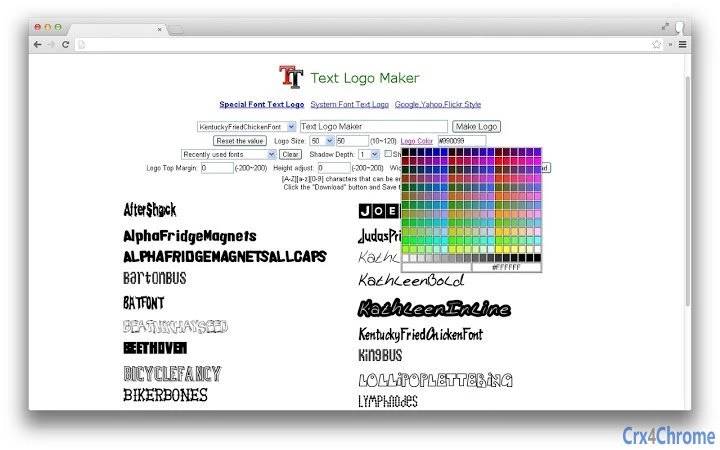
The Free Logo Maker Tool is a desktop application designed to help users generate custom text-based logos quickly and intuitively. It enables individuals and small businesses to create professional-looking logos using text elements such as names, email addresses, URLs, and other identifiers. The tool is ideal for entrepreneurs, content creators, and designers who need a fast and accessible way to produce visual branding assets without advanced design skills. By focusing on text customization, the software removes the complexity of traditional logo design, allowing users to adjust fonts, colors, sizes, and layout to match their brand identity. Real-world use cases include branding for social media profiles, small business websites, personal projects, and online stores. The app also supports direct saving to Google Drive, streamlining workflow for users who rely on cloud-based file management. While the developer has not provided detailed background information, the application appears to be built with simplicity and accessibility in mind, targeting users who value speed and ease of use over advanced graphic editing capabilities.
Key Features & Capabilities
- Text-Based Logo Creation – Generate logos using any text input such as business names, personal handles, email addresses, or URLs. This feature is especially useful for users who want to visually represent their digital identity.
- Customization Options – Adjust font style, color palette, text size, alignment, and spacing to tailor the logo to a specific brand or aesthetic. This flexibility allows users to experiment with different visual identities.
- Google Drive Integration – Save created logo images directly to Google Drive, enabling seamless cloud backup and access across devices. This is beneficial for users managing multiple projects or collaborating with others.
- Image Export from Text – Convert plain text into high-quality visual images suitable for use in digital and print media. This functionality supports quick branding needs without requiring external design tools.
- Simple Workflow – The application follows a streamlined process: input text → customize appearance → generate → save/export. This reduces the learning curve and makes the tool accessible to non-designers.
User Interface, Workflow & Performance
The user interface of the Free Logo Maker Tool is designed with simplicity in mind, featuring a clean layout that prioritizes core functions. Users can input text into a central field, with real-time previews of the logo as changes are made. Navigation is straightforward, with clearly labeled options for font selection, color pickers, and export settings. The workflow is linear and intuitive, guiding users through each step without unnecessary complexity. While specific performance metrics such as CPU or RAM usage were not provided, the application appears to operate smoothly based on general behavior of lightweight desktop tools. The developer did not specify resource usage details, so performance may vary depending on system configuration. Stability during extended use was not documented, but the absence of known issues suggests reliable operation under normal conditions. The application does not appear to require constant internet connectivity for core functions, though Google Drive integration may require an active connection for file uploads. Overall, the interface supports efficient task completion, making it suitable for users seeking a no-frills logo creation experience.
Compatibility & System Requirements
The Free Logo Maker Tool is compatible with both Windows and Mac operating systems, making it accessible to a broad range of users across different platforms. The software is available as a desktop application, allowing installation and use without browser dependency. The exact system requirements were not listed, so users should ensure their device meets general standards for running desktop applications. Installation size was not specified, but based on the application’s focus on text-based design, it is likely to be lightweight. The developer did not provide information about hardware requirements such as processor speed, RAM, or graphics capabilities. Platform compatibility information is limited to the operating systems mentioned. Users are advised to check for updates or official documentation to confirm suitability for their specific system setup. For optimal performance, it is recommended to run the software on a machine with up-to-date OS patches and sufficient storage space.
Pros and Cons
Pros
- Simple, intuitive interface ideal for non-designers
- Free to use with no hidden costs
- Direct Google Drive integration for easy file management
- Fast logo generation from text inputs
- Supports customization of fonts, colors, and layout
Cons
- No advanced design tools or vector export options
- Exact system requirements not disclosed
- Limited to text-based logo creation
- No offline mode for Google Drive sync
- Developer background not publicly available
FAQ Section
Is the Free Logo Maker Tool available for Windows and Mac?
Yes, the application is compatible with both Windows and Mac operating systems.
Can I use this tool without an internet connection?
The core functionality of creating and customizing text logos can be used offline. However, saving files to Google Drive requires an active internet connection.
Is the software safe to download and install?
The software is designed for secure use, but users should download it from official sources to avoid potential risks.
Does the tool support vector file exports?
There is no information available about vector export capabilities. The tool appears to focus on raster image outputs.
How often are updates released?
Update frequency was not specified. Users should check the official website or application for the latest version.
Final Thoughts + CTA
The Free Logo Maker Tool delivers a focused and accessible solution for users who need to create simple, text-based logos quickly. Its strengths lie in ease of use, fast generation, and seamless Google Drive integration, making it a practical choice for individuals and small businesses with basic branding needs. While it lacks advanced design features and detailed system specifications, it fulfills its primary purpose effectively. The absence of cost removes a major barrier to entry, and the straightforward workflow ensures minimal friction. For users seeking a no-compromise tool to turn text into visual logos, this app stands out as a reliable option. Download Free Logo Maker Tool now to start designing your brand identity today.
Guides & Tutorials for Text Logo Maker App for Chrome
How to install Text Logo Maker App for Chrome
- Click the Preview / Download button above.
- Once redirected, accept the terms and click Install.
- Wait for the Text Logo Maker App for Chrome download to finish on your device.
How to use Text Logo Maker App for Chrome
This software is primarily used for its core features described above. Open the app after installation to explore its capabilities.
User Reviews for Text Logo Maker App for Chrome 0
No reviews found





